Teach the agent your house style once
The first good image is easy. Image #40 still following your rules is the hard part. Write the rules down once, in your workspace, and every matching job reads them — and gets sharper each time you correct it.
Why a rules file, not a better prompt
A prompt lives for one conversation. Your craft — "never a white background", "label text is exactly two lines", "hands always look wrong, don't show them" — is knowledge your team earned shoot by shoot. Kept as a file in your workspace, it outlives every chat, every teammate's memory, and every model change. Each rule carries the reason it exists, so the next person (or the agent) knows what not to undo.
A real run, start to finish
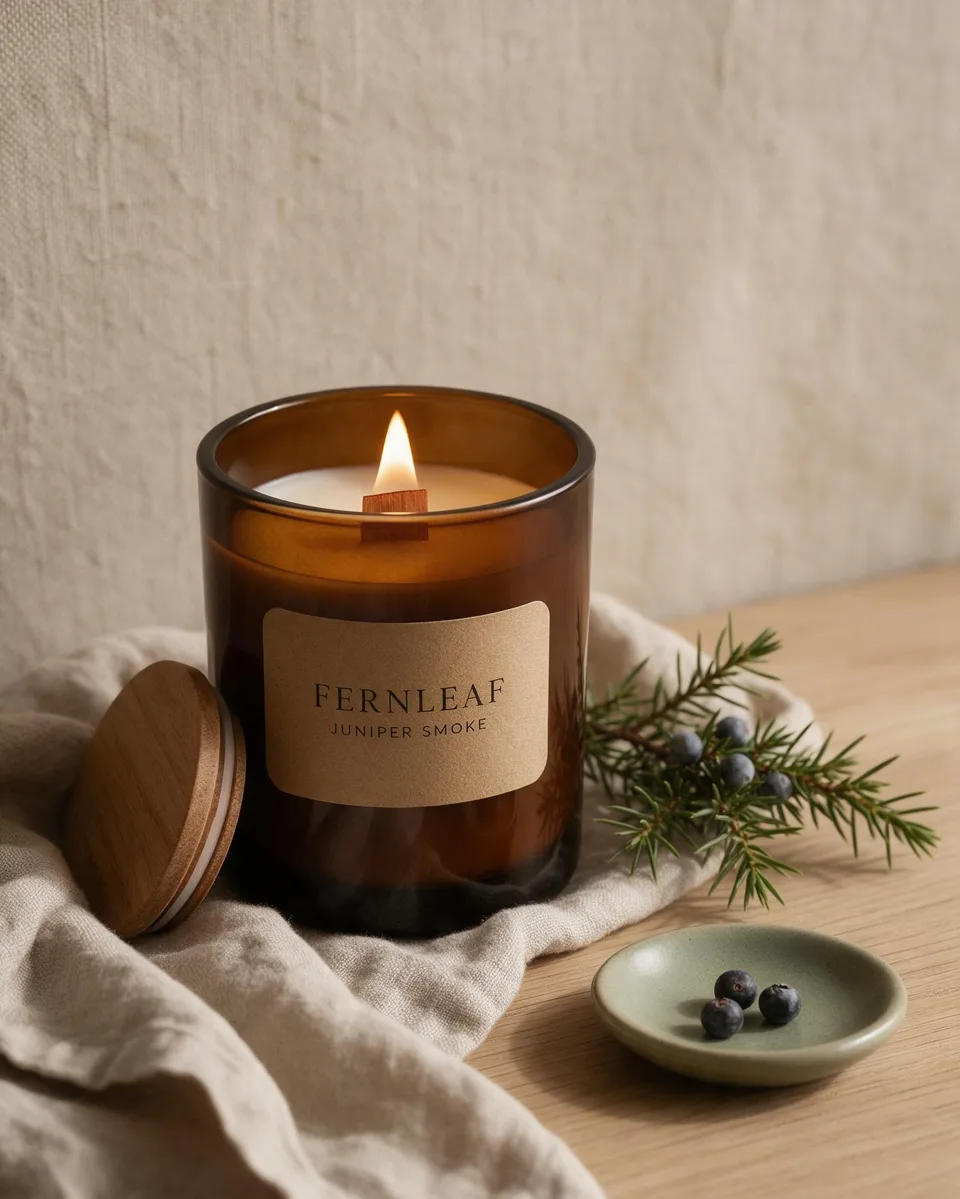
Fernleaf Candle Co. is a made-up brand for this guide; the image is AI-generated. The steps, files, and replies below are from an actual run of the agent.
1. Put the rules in your workspace
Create Skills/fernleaf-product-photos/SKILL.md.
The two header lines matter: name identifies it, description tells the agent when to use it. Everything below is yours —
plain Markdown, any structure.
---
name: fernleaf-product-photos
description: House style for every Fernleaf Candle Co. product photo
  (Instagram, shop listings, ads). Use whenever an image of a
  Fernleaf candle is requested.
---

# Fernleaf Candle Co. — product photo house style (v3)

## 1. Canvas
- Instagram feed = 4:5. Shop listing = 1:1. Never 16:9.
- Candle 35–45% of frame height, on the lower-third line.

## 2. Light & palette
- Single soft window light from the LEFT, ~3500K.
- Oat, warm linen, sage, smoked amber. No pure white
  backgrounds (v2: read as "generic dropshipper").

## 3. Product fidelity (non-negotiable)
- Matte amber glass tumbler, wooden wick lid.
- Kraft label, two lines only: FERNLEAF / scent name.
- Small steady flame (v2: tall flames looked unsafe in ads).

## 4. Props (pick 2–3, never more)
- Linen napkin, the scent's botanical, a ceramic dish.
- Banned: fake snow, glitter, hands holding the jar
  (v3: hands consistently looked wrong).

## 5. Known limits
- Label text beyond two short lines garbles.
Prefer not to touch files? Paste your rules into the chat and say "save this as our house style so you follow it automatically next time" — the agent writes the file for you.
2. Give a one-line brief — don't mention the rules
"Make an Instagram product photo for our new Juniper Smoke candle."
The agent matched the brief to the skill's description, loaded the rules on its own, and compiled them into the image brief: 4:5 canvas, left window light, oat-and-sage palette, two-line kraft label, linen + juniper sprig + ceramic dish, no hands.
3. When something misses, add a rule — not a re-prompt
The shot was good, but the wooden lid sat in the foreground, competing with the label. Instead of fixing it for this one image:
"One lesson from this shoot: the wooden lid kept drifting into the foreground. Add a rule to our Fernleaf house style so the lid always sits behind the jar, then bump it to v4."
The agent edited the file itself — keeping the convention that every rule says why it exists:
- Wooden wick lid leans against the jar from **behind**,
  partially hidden by it — never in front of the jar
  (v4: lid kept drifting into the foreground and
  competing with the label).
Every future Fernleaf shot — from you, a teammate, or a scheduled run — now inherits that lesson. That's the whole loop: brief → result → one new rule.
Where this pays off
Studios with many clients. One rules file per client in that client's group workspace — the agent reads the right one because it only sees that group's files.
Recurring output. Pair a rules file with an automation and the weekly post, listing set, or report comes out on-style without anyone in the loop until review.
Not just images. The same file works for deck layouts, newsletter voice, report structure — anything your team does the same way every time. Keep your rules in Obsidian if you prefer editing there.
Honest limits: rules make results consistent, not perfect — an image model can still miss a rule. Use the "Known limits" section of your file to record what doesn't hold, and review before you publish.
Free to start · no account needed to try