Yesterday we posted the story of a whim: one casual sentence became an installable desktop clock. This morning the app got its first real feature request — and it did not come from the founder. It came from the founder's wife, who actually uses the thing: "要是时钟上带事项提醒功能就好了" — if only the clock had reminders.
That is the v2 test every little app faces: does the second feature cost a project, or a sentence? Here is the honest play-by-play — it cost a handful of sentences and three screenshots, inside a single morning.
The ask, and where it happened
The request landed at 08:26, inside the user's daily report conversation — he had
just finished reading the morning brief when he typed the wish out loud. Forty minutes
later came the working order: "from the op-clock version, make a first pass — copy it
into a new project subdirectory so the original stays untouched." The agent cloned the
clock into Projects/desktop-clock-reminders/ and left the original alone.
One honest footnote on that location: building a feature inside a report-reading session is exactly the kind of context pollution that motivated us to ship, later that same day, a way for the agent to hand big side-quests to a fresh session. This conversation is the reason that feature exists — so yes, we felt the problem firsthand before fixing it.
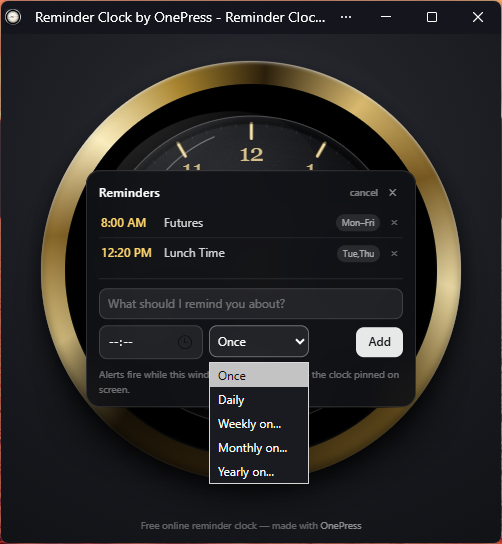
8:00 AM Futures · Mon–Fri, 12:20 PM Lunch Time · Tue,Thu.Design by screenshot, not by spec
Recurrence was the interesting design surface. The agent's first pass offered Once / Daily / Weekdays / Weekly / Monthly / Yearly in a dropdown. The user pasted a screenshot back with one line: "我怎么没有看到 Mon-Fri?" — where did Monday-to-Friday go? A real bug, caught by a real screenshot, fixed in the next round.
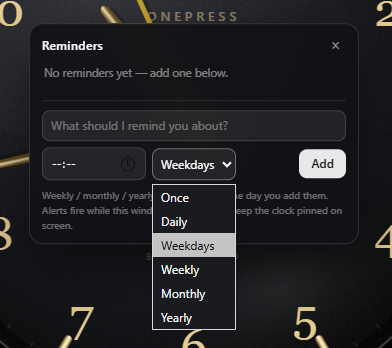
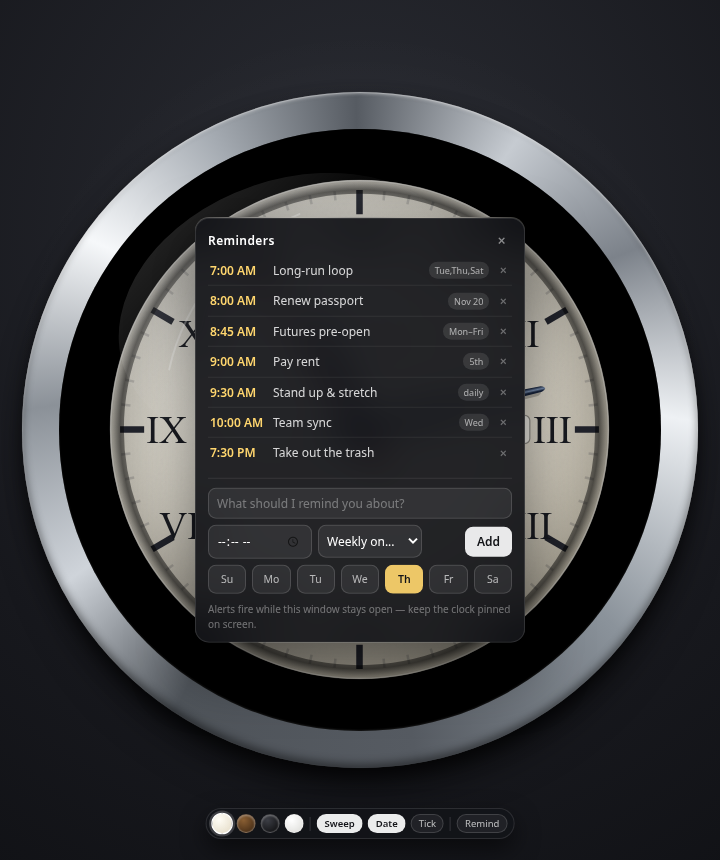
Then the better idea, also one sentence: "merge Weekdays and Weekly — give me seven checkboxes, with today's weekday pre-checked. Monthly and yearly too, with defaults." That is a UX spec a designer would charge a meeting for, delivered as a chat message. The agent rebuilt the picker around day-chips (Su Mo Tu We Th Fr Sa), kept the defaults, and re-ran its own visual QA on the result.
One more ask: click to edit
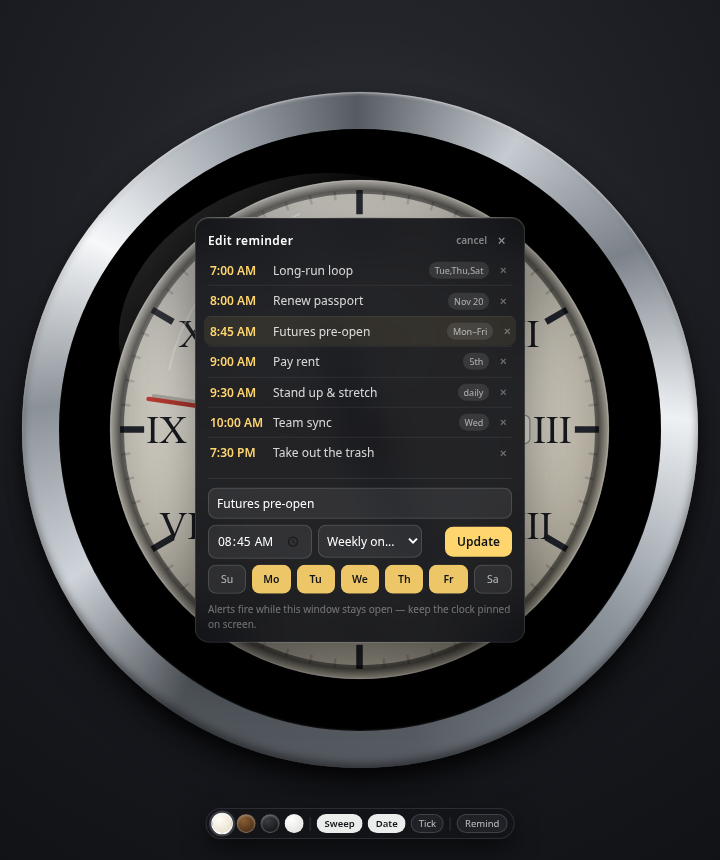
The last feature came from the same lazy-user instinct we all have: "can existing reminders be clicked and edited?" Yes — tap a row, the form pre-fills, and Add becomes Update. Small thing, but it's the difference between a reminder list and a reminder system you actually maintain.
A name of its own
The original clock lived at onepress-clock.pages.dev. The user asked for
something shorter — dingclock.pages.dev was free, so that is where it lives
now. There is a longer-term idea on the table too: a wildcard cert on *.getonepress.com would let a whole family of little free tools live on their
own subdomains (dingclock.getonepress.com and friends) at zero certificate
cost — each tool its own deployable, shareable thing. Free small tools are, honestly,
also a distribution channel: useful in themselves, and each one quietly says who made it.
And because this product sells honesty about limits, here is the one the clock itself states in its own UI: "Alerts fire while this window stays open — keep the clock pinned on screen." A web app cannot wake a sleeping OS. What it can do is be good enough that people keep the window around — which, for a clock, they were doing anyway.
The math, again
Feature request at 08:26, final QA pass a few minutes past 11:00 — under three hours of
wall time, most of it the agent working alone. Human input: about ten one-line messages
and three pasted screenshots. The original clock is untouched; the reminder version is
live at dingclock.pages.dev.
The first post was about an app appearing from a whim. This one is the more important half of the story: the second feature cost the same as the first — a sentence. That is what "the app keeps improving" is supposed to feel like, and it only works because the whole thing is ordinary files and conversation all the way down.
FAQ
- Can the agent add features to an app it already built?
- Yes — shipped apps are ordinary files in your workspace. Describe the change (or paste a screenshot of what looks wrong); the agent edits the code, re-checks its own renders, and redeploys. Iterating is the same loop as building.
- Is the reminder clock free to use?
- Yes —
dingclock.pages.devis a free installable web app. Open it in a browser, click Install, and reminders fire while the window stays open. - What reminder schedules does it support?
- One-time, daily, weekly (individual weekday checkboxes — Mon–Fri or Tue/Thu/Sat are one tap), monthly on a date, and yearly, with sensible defaults pre-selected.
- Do I need to write a spec to get a feature added?
- No — this went from “my wife said it would be nice” to a shipped update using one-line messages and three screenshots, one of which was the bug report itself.
Try it: open dingclock.pages.dev and click Install — or open the app and tell it what your version of the clock should do next.
Reading this and have thoughts?
Spot a mistake, disagree, or want a follow-up? Tell us — a human reads it.