कल हमने एक whim की कहानी post की थी: एक कैज़ुअल sentence एक installable desktop clock बन गई। आज सुबह app को उसका पहला असली feature request मिला — और वह founder की तरफ़ से नहीं आया। वह founder की पत्नी की तरफ़ से आया, जो असल में उस चीज़ को इस्तेमाल करती हैं: "要是时钟上带事项提醒功能就好了" — काश clock में reminders होते।
यही वह v2 test है जिसका सामना हर छोटे app को करना पड़ता है: क्या दूसरा feature एक project की कीमत पर मिलता है, या एक sentence की? यह रहा ईमानदार play-by-play — इसकी कीमत एक मुट्ठी भर sentences और तीन screenshots, एक ही सुबह के अंदर।
माँग क्या थी, और कहाँ हुई
Request 08:26 पर आया, user की daily report conversation के अंदर — उसने
अभी-अभी morning brief पढ़कर ख़त्म किया था जब उसने अपनी इच्छा type कर डाली। चालीस मिनट
बाद working order आया: "op-clock version से एक first pass बनाओ — इसे एक नए
project subdirectory में copy करो ताकि original untouched रहे।" agent ने
clock को Projects/desktop-clock-reminders/ में clone किया और original को
वैसा ही छोड़ दिया।
उस location पर एक ईमानदार footnote: किसी report-पढ़ने वाले session के अंदर feature बनाना बिल्कुल वैसी ही context pollution है जिसने हमें — उसी दिन बाद में — यह तरीका ship करने के लिए प्रेरित किया कि agent बड़े side-quests एक fresh session को सौंप सके। यह conversation उस feature के मौजूद होने की वजह है — तो हाँ, हमने इसे ठीक करने से पहले problem को ख़ुद महसूस किया।
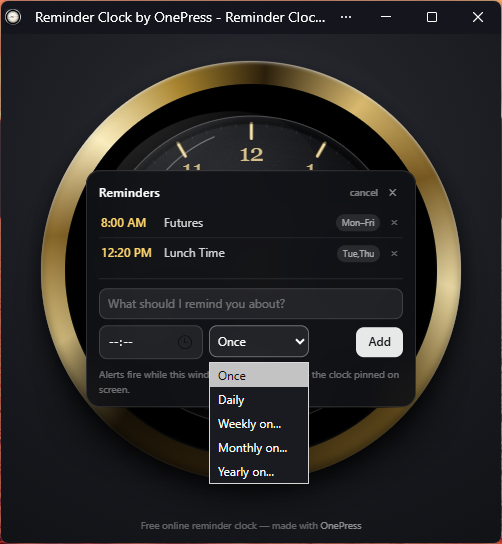
8:00 AM Futures · Mon–Fri, 12:20 PM Lunch Time · Tue,Thu.Design screenshot से, spec से नहीं
Recurrence ही interesting design surface थी। agent के first pass ने एक dropdown में Once / Daily / Weekdays / Weekly / Monthly / Yearly ऑफ़र किए। user ने एक line के साथ screenshot वापस paste किया: "我怎么没有看到 Mon-Fri?" — Monday-से-Friday कहाँ गया? एक असली bug, एक असली screenshot से पकड़ा गया, अगले round में ठीक हुआ।
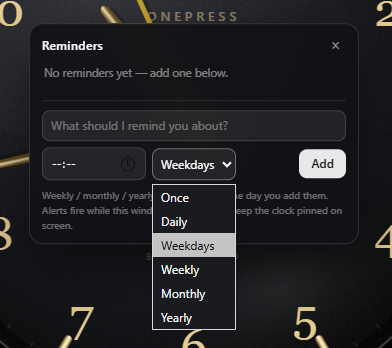
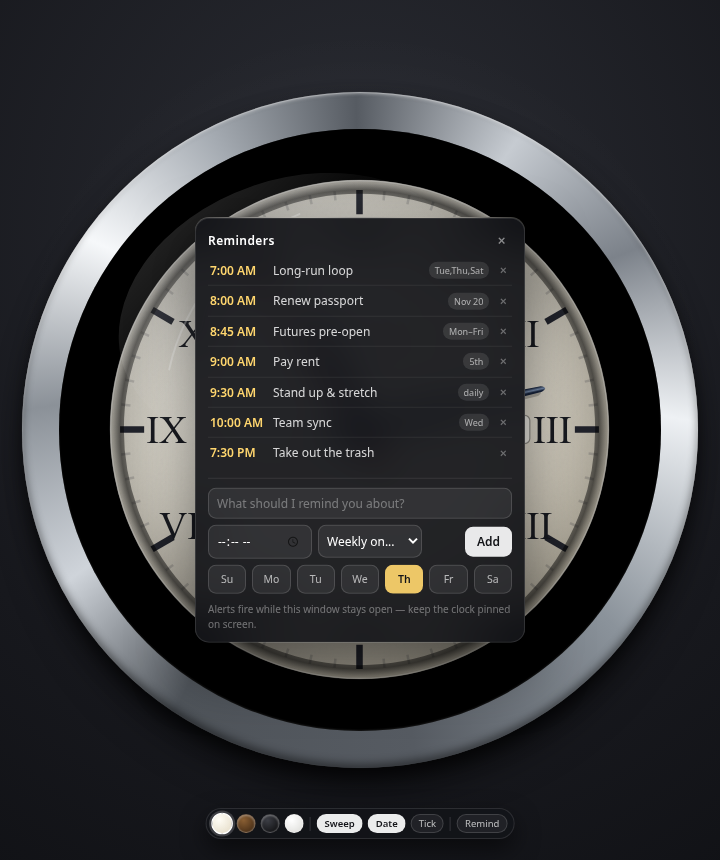
फिर बेहतर idea, वह भी एक sentence: "Weekdays और Weekly को merge करो — मुझे सात checkboxes दो, आज का weekday पहले से checked। Monthly और yearly भी, defaults के साथ।" यह एक ऐसी UX spec है जिसके लिए designer एक meeting चार्ज करता, और यह एक chat message के रूप में आई। agent ने picker को day-chips (Su Mo Tu We Th Fr Sa) के इर्द-गिर्द फिर से बनाया, defaults बरक़रार रखे, और result पर अपनी visual QA दोबारा चलाई।
एक और माँग: edit करने के लिए click
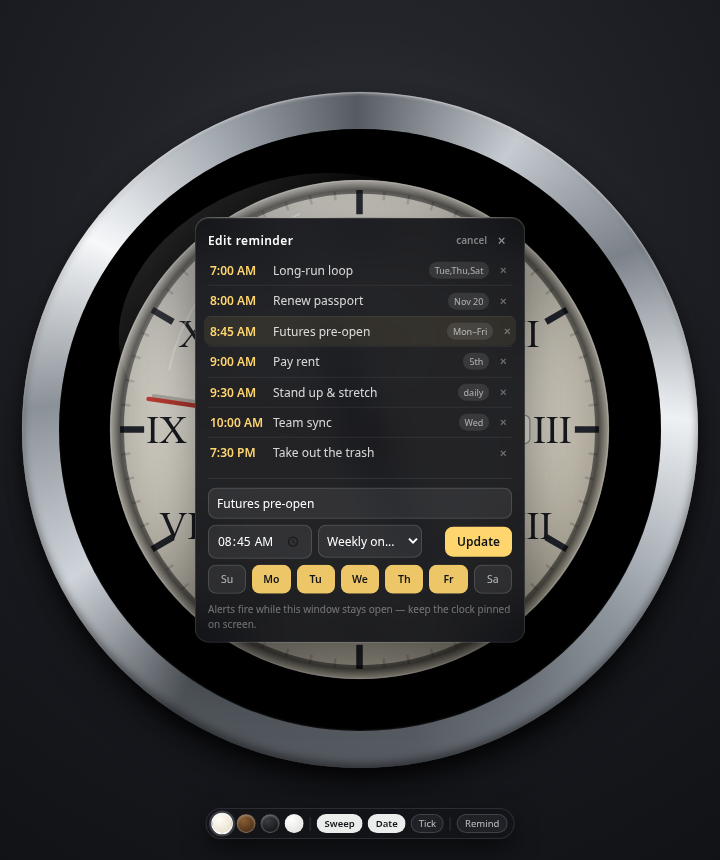
आख़िरी feature उसी lazy-user instinct से आया जो हम सबमें होती है: "क्या मौजूदा reminders को click करके edit किया जा सकता है?" हाँ — एक row tap करो, form pre-fill हो जाता है, और Add बन जाता है Update। छोटी चीज़, लेकिन यही अंतर है एक reminder list और एक reminder system के बीच जिसे आप असल में maintain करते हैं।
अपना एक नाम
Original clock onepress-clock.pages.dev पर रहती थी। user ने कुछ छोटा
माँगा — dingclock.pages.dev ख़ाली था, तो अब वह वहीँ रहती है। एक
longer-term idea भी मेज़ पर है: *.getonepress.com पर एक wildcard cert से
छोटे free tools का पूरा परिवार अपने-अपने subdomains पर रह सकता है
(dingclock.getonepress.com और उसके दोस्त) zero certificate cost पर — हर
tool अपनी deployable, shareable चीज़। Free छोटे tools — ईमानदारी से कहें — एक
distribution channel भी हैं: अपने आप में उपयोगी, और हर एक चुपचाप बता देता है कि इसे
किसने बनाया।
और क्योंकि यह product limits के बारे में ईमानदारी बेचता है, यह रही वह बात जो clock ख़ुद अपनी UI में लिखती है: "Alerts तभी बजते हैं जब यह window खुली रहती है — clock को screen पर pinned रखें।" एक web app सोते हुए OS को जगा नहीं सकता। वह बस इतना अच्छा हो सकता है कि लोग window को खुला रखें — जो कि एक clock के लिए लोग वैसे भी कर ही रहे थे।
हिसाब, फिर से
Feature request 08:26 पर, final QA pass 11:00 से कुछ मिनट आगे — wall time में तीन
घंटे से भी कम, जिसमें ज़्यादातर समय agent अकेले काम करता रहा। Human input: करीब दस
one-line messages और तीन paste किए हुए screenshots। Original clock untouched है;
reminder version dingclock.pages.dev पर live है।
पहला post उस app के बारे में था जो एक whim से नज़र आ गया। यह post कहानी का ज़्यादा ज़रूरी आधा हिस्सा है: दूसरे feature की कीमत पहले जितनी ही थी — एक sentence। "app लगातार बेहतर होता रहता है" का ऐसा ही महसूस होना चाहिए, और यह सिर्फ़ इसलिए काम करता है क्योंकि पूरी चीज़ नीचे तक ordinary files और conversation है।
FAQ
- क्या agent पहले से बने किसी app में features जोड़ सकता है?
- हाँ — shipped apps आपके workspace में ordinary files होते हैं। बदलाव बताएँ (या जो ग़लत दिखे उसका screenshot paste करें); agent code edit करता है, अपने renders दोबारा check करता है, और redeploy करता है। Iterate करना वही loop है जो बनाने का है।
- क्या reminder clock इस्तेमाल के लिए free है?
- हाँ —
dingclock.pages.devएक free installable web app है। इसे browser में खोलें, Install पर click करें, और window खुली रहने तक reminders बजते हैं। - यह कौन-कौन से reminder schedules support करता है?
- One-time, daily, weekly (individual weekday checkboxes — Mon–Fri या Tue/Thu/Sat एक tap में), किसी date पर monthly, और yearly, sensible defaults पहले से चुने हुए।
- क्या feature जुड़वाने के लिए मुझे spec लिखनी होगी?
- नहीं — यह "मेरी पत्नी ने कहा कि होना अच्छा रहेगा" से लेकर shipped update तक one-line messages और तीन screenshots से पहुँचा, जिनमें से एक ख़ुद bug report था।
आज़माएँ: dingclock.pages.dev खोलें और Install पर click करें — या app खोलें और बताएँ कि आपके clock का version आगे क्या करे।
Inside OnePress — the build log
More posts like this, plus the weekly AI digest, straight to your inbox.
Get the build log in your inbox →Reading this and have thoughts?
Spot a mistake, disagree, or want a follow-up? Tell us — a human reads it.